Pixel Stick: A Creative Font for Retro Game Design Themes
Why This Display Typeface Captures Nostalgia Perfectly
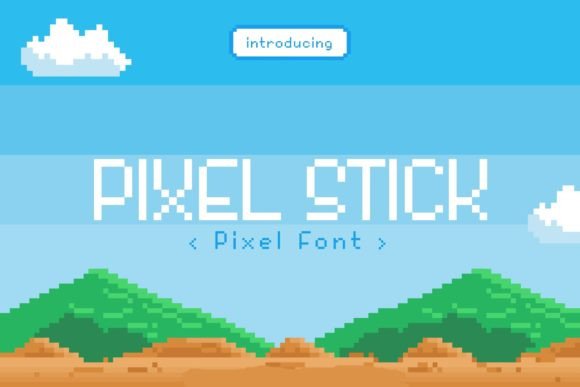
There’s something magnetic about the chunky, blocky letterforms of early video games. If you’ve ever wanted to bottle that specific energy for a modern project, Pixel Stick is the design asset you need in your toolkit. It isn’t just a font; it is a stylistic time machine. As a premium font designed specifically for retro aesthetics, it mimics the low-resolution rendering of 8-bit and 16-bit eras without looking messy or illegible. It strikes a balance between technical precision and playful nostalgia, making it a standout choice for anyone working in modern typography who wants to inject a bit of personality into their work.
Practical Applications: From T-Shirts to Web Design
When you are selecting a typeface, context is everything. You wouldn't use a flowing script font for a construction company, nor would you use a rigid corporate serif font for a skateboarding brand. Pixel Stick thrives in environments where high impact and visual distinctiveness are required.
Apparel and Merchandise
Digital Media and Web Design
In the realm of web design, speed and readability are king. However, display fonts are meant to catch the eye, not to be used for body text. Pixel Stick is perfect for hero sections, banner ads, and social media graphics. It pops immediately against a clean background. For content creators on platforms like YouTube or Twitch, using this font for thumbnails or channel branding instantly signals to the viewer that the content is related to gaming, tech, or pop culture. It sets the expectation before the viewer even clicks play.
Publishing and Editorial Design
Even in traditional publishing, there is a place for this style. If you are designing a book cover for a sci-fi thriller or a magazine spread about the history of arcade cabinets, Pixel Stick provides a thematic anchor. It works beautifully as a drop cap or a pull quote style in editorial design, breaking the monotony of standard sans serif or serif body text.
Mastering Visual Hierarchy and Brand Perception
Typography does more than just display words; it shapes how an audience feels about the content. This is known as brand perception. When you use a retro game font like Pixel Stick, you are invoking specific emotions: nostalgia, excitement, and a DIY ethos. This can be incredibly powerful for small business owners looking to build a brand identity that feels approachable and "cool" without trying too hard.
However, achieving the right visual hierarchy requires restraint. Because Pixel Stick has such a strong personality, it can easily overpower a layout if used for every single word. The key is contrast. If you pair this bold display font with a clean, geometric sans serif font for your body copy, the headlines will pop even more. This contrast creates a professional look. It shows that you understand the principles of modern typography—using the display font for the "shout" (headlines) and the sans serif for the "conversation" (body text).
Consider the difference between a flyer written entirely in blocky pixels versus one that uses Pixel Stick for the event name and a clean sans serif for the location and time. The latter looks polished and legible, while the former might look cluttered. By managing this hierarchy, you ensure that your message is not only seen but also understood, which is the ultimate goal of any design asset.
Integrating Pixel Stick Into Your Workflow
If you are convinced that this style fits your next project, here are a few practical steps to ensure you get the most out of it. First, check the font pairing options. As mentioned, Pixel Stick works best with clean fonts. Try pairing it with a monospaced sans serif to lean into the coding aesthetic, or a rounded sans serif to soften the edges and make it more kid-friendly.
Ultimately, Pixel Stick is more than just a novelty; it is a robust tool for creative expression. It bridges the gap between the digital past and the present, allowing designers, marketers, and creators to craft visuals that resonate on an emotional level. Whether you are designing a logo, a poster, or a website header, embracing this retro pixel display font can elevate your project from standard to standout.